Posts

Showing posts with the label increase

Top 4 apps to clean up your Android
Image
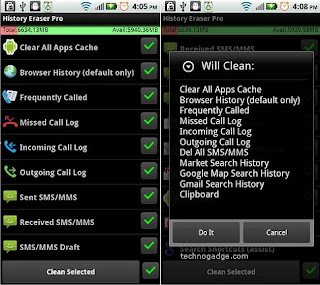
Android is truly a great OS when comes to multitasking and performing out of the box functions. But just like any other OS, it doesn't give you the utility to clean up your internal memory. The internal memory is being continuously used up by the cache files produced by apps, call log, text messages, search history etc.. Therefore. it becomes imperative to clean up your device once in a while to free up the cluttered space and make it faster. So, here is a list of the top 4 apps that you can try to clean up your Android :- 1) HISTORY ERASER-   History Eraser is currently the top app in the Google Play Store that allows you to clean up your Android device without any hassles at all. The interface is pretty easy to use and understand. As shown in the pic, you can tick mark whatever you want to delete/clean up from your device and then click "clean selected" button at the bottom, a prompt will appear telling you whatever you are deleting, just click on "do it...

Trick to increase internet speed on Windows

Image
by TechStormer TS Are you pissed off with the internet speed on your Windows??? Even though you have a great data connection do you still want to increase the speed of your internet?? Well, computer science is lifeless without tricks. In this article, I've provided you a simple trick that you'll need to implement on Windows. After you've done with the procedure I've provided below, just observe the changes in the internet speed ( believe me, the difference is large!). STEP 1) Start up your PC and click on the "start" button on the desktop. STEP 2)  Now open the "run" window and type in " gpedit.msc"  and press ok. This will open the Local Group Policy Editor window. STEP 3) Open Local Computer Policy-> Computer Configuration-> Administrative templates->Network->  QoS Package Scheduler-> Limit Reservable Bandwidth. STEP 4) The Limit Reservable Bandwidth screen will pop up. STEP 5) You'll find th...