Posts

Behold the future of computer technology:Part 1

Image
In today's fast paced world, the technology is also advancing at a hefty pace.Today,smartphones,ultrabooks, tablets, cloud computing, 3G/4G etc. are already impacting a major population of the world. But who says it all ends here? This is the beginning, beginning of better technology to follow and make us behold in awe! So lets have a look at what we can expect in the near future:- 1) Smart monitors - Just like smart TVs' we'll have smart monitors or even better. Gesture or touch controlled monitors would be the norm in the years to come. Be it playing games, surfing the net, watching a movie or writing a program, operating on smart monitors would be a breeze. 2) Ink-less printers- Gone are the days of those expensive cartridges! Welcome ink-less printers! Recently Dell launched an ink-less printer for the mobile users-  Wasabi PZ310 Photo Printer .  It uses Zink zero-ink technology and supports Bluetooth.  Get clean ink less photographs, colo...

8 Awesome features of Outlook.com

Image
Do you remember Hotmail? Well, offcourse you do! Hotmail was the first free web-based email service provider owned by Microsoft. Many of us might even have made our first email account on it (I did!).But all good things come to an end and its time to bid adieu to Hotmail finally... But, Hey! This is not the end. Microsoft has come out with a new,refreshing, more clean version of Hotmail called Outlook . So lets have a look at its 11 awesome features:- 1) Metro Interface- Outlook has a pretty clean metro user interface resembling Windows 8. All the unnecessary stuff has been dropped out to bring out the simplicity. 2) Mail Sorting- Intelligent auto sorting of mails is a completely new feature that'll surely make your life easier! 3) Auto clean up- The scheduled auto clean up feature that retains the last mail from a sender is another added bonus. 4) Skype- No need to download Skype as a separate app as it is a part and parcel of Outlook. 5) Social linking- ...

Top 3 Panoramic camera apps for Android

Image
Android is all about functionality. You can do unimaginable things with this versatile mobile OS, one of them being taking panoramic shots! Though Android ICS comes built-in with the panoramic mode in its camera app, Android Gingerbread(2.3), Froyo(2.2) and other lower-end Android versions do not come with this feature. Hence, if you want a taste of the panoramic shots on your Android, just give these apps a try:- 1) Photaf Panorama - This great app has already been downloaded 22000+ times on the Google Play Store. What sets this app apart from the others is its clean and easy to use interface. It helps you in creating beautiful 360 degree panoramic photos utilizing the camera of your Android and the orientation sensor to tell you at what angle the shot was taken. This app automatically stitches the photos to create a seamless 360 degree panoramic photo, which you can also set as your wallpaper. The pro version costs around $4. This version is free of cost and is rated...

Top 2 launchers for Android ICS

Image
Android Ice Cream Sandwich 4.0 is spreading like fire across the world. New handsets with ICS are being released, updates are being provided to compatible phones and development on this latest version is also in full swing! But what takes the fun out of ICS is the UI that comes bundled along with this wonderful mobile OS. Taking the example of HTC and Samsung, both of them come with their own UIs i.e. Sense for HTC and Touchwiz for Samsung. But usually these UIs take the cake away from ICS in a big way. So here are the top 2  launchers for ICS that you can try out to bring back the original charm of ICS on your device or change things ,the way you want to! 1) Apex Launcher - Apex Launcher is currently the best launcher for ICS 4.0+ devices.Its swift, robust and highly customizable. It comes bundles with numerous features including customizable homescreens, fancy transition effects, multiple drawer styles etc. Though the pro version comes for around $4 on the Google ...

Trick to create password protected folder on Windows 7

Image
Windows 7 is one of the most widely used computer operating systems in the world. Due to its standout features, ease of use and trusted brand-Microsoft, Windows 7 is a powerful package all together. Though Windows 7 is almost a perfect OS, it does lack a few minor features and one of them is creating a password protected folder. You do have the option of creating separate accounts, but the option of creating password protected folders is missing out. Many softwares are available in on the web that allow you to create password protected folders, but in this post I'll tell you how to make password protected folders on Windows 7 and that too without any softwares! Just follow the steps given below:- 1) You need to create a new folder and save is anywhere with any name. 2) Now, open the folder and right click in the blank area inside it. 3) In the menu that pops up, select New-> Text Document. 4) Open the text document you created by double clicking on it, ...

Ubuntu for Android: The big leap!

Image
Ubuntu and Android have finally joined hands for the sake of humanity! Ubuntu, the most popular free OS for PCs' and Android, the most loved mobile OS, have come together to bring you the functionality and charm of both, on the same device. Recently, Canonical ltd. announced an upcoming free and open source variant of Ubuntu designed to run on Android phones. Ubuntu for Android   was showcased at the Mobile World Congress this year and is expected to come pre-loaded with some phones in the near future. The basic concept/idea behind Ubuntu for Android is that your phone becomes a mobile PC, wherein you can switch from Android to Ubuntu full desktop mode when you dock your device to a bigger display along with a keyboard and mouse. FEATURES OF UBUNTU FOR ANDROID:- 1) As both Android and Linux share the same kernel i.e. is Linux, both of them run at the same time on the device. Hence, there is no need to reboot. 2) Once the device is connected to the desktop monito...

Top 4 apps to clean up your Android

Image
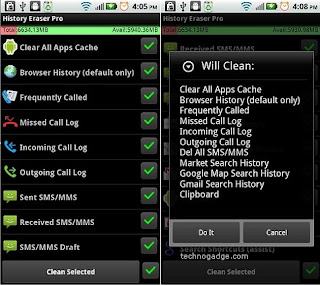
Android is truly a great OS when comes to multitasking and performing out of the box functions. But just like any other OS, it doesn't give you the utility to clean up your internal memory. The internal memory is being continuously used up by the cache files produced by apps, call log, text messages, search history etc.. Therefore. it becomes imperative to clean up your device once in a while to free up the cluttered space and make it faster. So, here is a list of the top 4 apps that you can try to clean up your Android :- 1) HISTORY ERASER-   History Eraser is currently the top app in the Google Play Store that allows you to clean up your Android device without any hassles at all. The interface is pretty easy to use and understand. As shown in the pic, you can tick mark whatever you want to delete/clean up from your device and then click "clean selected" button at the bottom, a prompt will appear telling you whatever you are deleting, just click on "do it...